Monday, March 13, 2023

Technological Advancements in Banking

The banking industry has undergone significant transformations over the years, with technology playing a crucial role in shaping its evolution. With technological advances, banks have been able to streamline their processes, improve customer experience, and enhance security. In this blog post, we will explore some of the technological advances in banking that have transformed the industry.

Online and Mobile Banking

Online and mobile banking have revolutionized the way people interact with their banks. Customers no longer need to physically visit their bank branches to conduct transactions such as checking their account balance, transferring funds, or paying bills. With online and mobile banking, customers can perform these transactions from the comfort of their homes, offices, or on the go, using their smartphones, tablets, or computers. This has greatly enhanced convenience and accessibility for customers, resulting in a more seamless banking experience.

Digital Payments

Digital payments have become increasingly popular over the years, with banks introducing various options such as mobile wallets, peer-to-peer payments, and contactless payments. These payment options are not only convenient but also secure, with many banks leveraging advanced technologies such as biometrics and encryption to ensure customer safety.

Artificial Intelligence and Machine Learning

Artificial intelligence (AI) and machine learning (ML) have become game-changers in the banking industry. Banks are using these technologies to automate processes such as fraud detection, risk management, and customer service. AI and ML algorithms can analyze large amounts of data and detect patterns that humans may miss, allowing banks to make data-driven decisions and improve their overall efficiency.

Blockchain Technology

Blockchain technology has been gaining traction in the banking industry as a secure and transparent way to store and transfer information. Banks are using blockchain technology to enhance security, reduce fraud, and streamline processes such as cross-border payments. Blockchain technology also allows for faster and more secure settlement of transactions, resulting in reduced costs and increased efficiency.

Chatbots and Virtual Assistants

Chatbots and virtual assistants have become increasingly popular in the banking industry, with many banks leveraging these technologies to enhance customer service. Chatbots and virtual assistants can handle basic customer inquiries, such as account balance and transaction history, freeing up human customer service representatives to handle more complex issues. This has resulted in faster response times and improved customer satisfaction.

Conclusions:

In conclusion, technological advances have transformed the banking industry, making it more convenient, efficient, and secure for customers. With the continued evolution of technology, we can expect even more exciting innovations in the banking industry in the future.

Sunday, March 12, 2023

The Many Problems with Twitter

Twitter is one of the most popular social media platforms, boasting over 330 million monthly active users. However, despite its widespread use, the platform has been plagued by a number of technological problems that have had a significant impact on users' experiences. In this blog post, we will explore some of the most pressing technological issues with Twitter and their potential consequences.

Scale and Performance

One of the biggest challenges for Twitter is its ability to scale and perform under heavy loads. As the platform continues to grow and gain popularity, the sheer volume of tweets, retweets, and user interactions can put a significant strain on Twitter's infrastructure, leading to performance issues, such as slow load times, timeouts, and error messages.

Spam and Fake Accounts

Another major issue with Twitter is the prevalence of spam and fake accounts. These accounts can be used to spread misinformation, manipulate trending topics, and promote malicious content. Despite Twitter's efforts to crack down on these accounts, they continue to be a persistent problem, and their impact on the platform's integrity cannot be underestimated.

Harassment and Abuse

Twitter has long been criticized for its handling of harassment and abuse on the platform. While Twitter has implemented various policies and tools to combat this issue, they have not been entirely successful in curbing the problem. Harassment and abuse can have a significant impact on users' mental health and well-being, and failure to address these issues can lead to a decline in user engagement and satisfaction.

Privacy and Security

Twitter has had its fair share of security breaches over the years, which have compromised user data and put users' privacy at risk. These breaches can lead to the theft of sensitive information, such as login credentials and personal data, which can be used for identity theft or other malicious purposes.

Content Moderation

Finally, Twitter's content moderation policies have come under scrutiny in recent years. Twitter has faced criticism from both sides of the political spectrum for its perceived bias in moderating content. While the company has made efforts to be more transparent in its content moderation practices, there is still a long way to go before it can be considered truly unbiased.

Conclusion

In conclusion, Twitter's technological problems are far from trivial. They can impact the platform's performance, integrity, and user experience. As Twitter continues to grow and evolve, it will be important for the company to address these issues and find effective solutions that protect users' privacy, ensure fair and unbiased content moderation, and promote a safe and positive online environment for all.


Saturday, March 11, 2023

Tech Startups: How to Get Funding

Tech startups are innovative and disruptive businesses that can transform industries and change the way we live our lives. However, they often require significant financial resources to get off the ground and grow, making funding a critical component of their success. In this article, we’ll explore some of the key ways tech startups can secure funding.

1. Angel Investors

Angel investors are high net worth individuals who invest their own money into startups. They can offer a valuable source of funding for tech startups, as they often have experience in the industry and can provide mentorship and connections. Angel investors typically invest smaller amounts of money than venture capitalists and are willing to take more risks.

To attract angel investors, startups should have a clear and compelling business plan and demonstrate their potential for growth and profitability. Networking events and online platforms such as AngelList and Gust can help startups connect with angel investors.

2. Venture Capital

Venture capital firms invest in startups that have the potential for high growth and significant returns. They typically invest larger amounts of money than angel investors and take an equity stake in the company in exchange for their investment.

To attract venture capital, startups must have a strong business plan and demonstrate their ability to scale quickly. They must also have a solid team in place with relevant experience and expertise. Startups can find venture capital firms through networking events, industry conferences, and online platforms such as Crunchbase.

3. Crowdfunding

Crowdfunding allows startups to raise funds from a large number of people, typically through online platforms such as Kickstarter, Indiegogo, and GoFundMe. Crowdfunding can be an effective way to raise money for early-stage startups that may not yet have a proven track record.

To attract crowdfunding investors, startups must have a clear and compelling pitch and offer attractive rewards to backers. Crowdfunding can also be an effective way to test the market and generate buzz for a new product or service.

4. Accelerators and Incubators

Accelerators and incubators are organizations that provide funding, mentorship, and resources to startups. They typically take an equity stake in the company in exchange for their investment.

Accelerators and incubators can be an effective way for startups to gain access to funding and mentorship from experienced entrepreneurs. They can also provide valuable resources such as office space, legal and accounting services, and access to industry connections.

5. Government Grants and Loans

Governments often provide grants and loans to startups that are working on innovative projects or creating jobs in the local economy. These grants and loans can be an effective way for startups to secure funding without giving up equity in their company.

To qualify for government grants and loans, startups must typically meet specific criteria, such as creating jobs, developing new technologies, or serving underserved communities. Startups can find government funding opportunities through local economic development agencies and online databases such as Grants.gov.

Conclusion

Securing funding is a critical component of success for tech startups. By exploring these five funding options, startups can find the financial resources they need to grow and thrive. Whether it’s through angel investors, venture capital, crowdfunding, accelerators and incubators, or government grants and loans, there are many ways for startups to raise the capital they need to turn their innovative ideas into reality.


Friday, March 10, 2023

What Are Smart Windows? Benefits and Applications

The concept of smart windows has been around for a few decades now, but recent advancements in technology have brought it closer to reality. Smart windows, also known as switchable glass, are designed to change their properties based on external stimuli such as temperature, light, and electricity. These windows have the potential to revolutionize the way we think about energy consumption and the design of buildings.

In this article, we will explore the technology behind smart windows, their benefits, and potential applications.

How Do Smart Windows Work?

Smart windows are made up of a layer of electrochromic, thermochromic, or photochromic material that can alter its transparency or opacity in response to external stimuli.

Electrochromic windows use electricity to change the color of the glass. When a small electric current is applied, ions move from one layer of the glass to the other, causing the glass to darken or lighten.

Thermochromic windows change their transparency in response to changes in temperature. When the temperature rises, the glass darkens, and when it cools down, it becomes transparent again.

Photochromic windows use sunlight to darken the glass. When exposed to UV light, the glass changes color, and when the light is removed, the glass becomes clear again.

Benefits of Smart Windows

Smart windows offer several benefits that traditional windows cannot match. First and foremost, they are energy efficient. By controlling the amount of light and heat that enters a building, they can reduce the need for heating, cooling, and lighting. This translates into lower energy bills and a smaller carbon footprint.

Another advantage of smart windows is that they offer greater control over the indoor environment. Users can adjust the transparency of the windows to block out glare, reduce heat gain, or create a more private space.

Smart windows also offer aesthetic benefits. By changing their color or opacity, they can add an element of dynamism to the design of a building. They can also be used as a canvas for digital art or advertising.

Applications of Smart Windows

Smart windows have a wide range of potential applications in various fields, including architecture, transportation, and electronics.

In architecture, smart windows can be used to design energy-efficient buildings that can adapt to changing weather conditions. They can also be used to create more comfortable indoor spaces and reduce the need for blinds or curtains.

In transportation, smart windows can enhance the passenger experience by blocking out sunlight and reducing heat gain. They can also be used to display information about the route, weather conditions, or points of interest.

In electronics, smart windows can be used to create flexible displays that can change their shape and transparency. This can lead to the development of new types of devices, such as foldable smartphones, e-readers, or wearables.

Conclusions

Smart window technology has the potential to transform the way we think about energy consumption and the design of buildings. By controlling the amount of light and heat that enters a building, they can reduce energy bills and create more comfortable indoor spaces. They also offer aesthetic benefits and can be used in various fields, such as architecture, transportation, and electronics.

As the technology continues to evolve, we can expect to see more applications and innovations in this field. Smart windows are a promising technology that can contribute to a more sustainable and efficient future.

Monday, May 8, 2017

Which Smartphone Apps Best Facilitate Recovery from Addiction?

At a time when there is an app for everything, it should be no surprise that there are smartphone apps to help with the addiction recovery process.

By utilizing an object most people have with them at all times, app developers are approaching addiction recovery from a personal angle for the digital age. From motivational inspiration and guided meditation to GPS tracking and panic buttons, these apps are designed to give a boost to anyone who is working through the recovery process.

Addiction Recovery Apps Worth Considering


If you’ve graduated a rehabilitation program and now need a little encouragement and accountability in your ongoing recovery, here are nine worthwhile smartphone apps that can help you out.

Twelve Steps – The Companion

Based on the traditional 12 steps of recovery, this app acts as an assistant for people going through the steps. The app offers daily meditations, a sobriety calculator, an AA meeting finder and readings from the Big Book of Alcoholics Anonymous.

A-CHESS

A-CHESS, or Addiction – Comprehensive Health Enhancement Support System, is designed to predict, detect and prevent relapse based on input from the user’s phone. The GPS feature can detect when the user is near a high-risk location. It also allows for connection to other A-CHESS members for discussion and support in times of vulnerability.

The app’s panic button feature sends a text message for assistance. A-CHESS also includes motivational and relaxation exercises to help users refocus.

iPromises

This app helps users track daily advancements during recovery with a progress-tracking calendar. It has motivational articles, daily inspirational messages and access to self-help support meetings. An Alcoholics Anonymous phone directory is also included so those using the app can connect with local sponsors and then attend meetings.

SoberTool

Helping its subscribers avoid relapse, SoberTool offers encouraging prompts and rewards. Some prompts include questions such as, “Are you experiencing bad feelings?” and, “Do you need help making a decision?” The developer, who has been sober for more than 25 years, is a licensed alcoholism and drug abuse counselor, and he holds a degree from Harvard University.

Mindfulness Meditation

When the mind becomes cluttered, reaching for mind- and mood-altering substances can be a tempting solution. This app helps users refocus and relax so their thoughts can return to where they should be. It helps reinforce positive behavior and refocus one’s energy.

The Drinking Mirror

Designed with young adults in mind, The Drinking Mirror gives a preview of what the future holds for someone who drinks excessively. With an uploaded photo and an input of how many drinks are consumed per day, the app formulates a picture of what the person may look like in 10 years if the habits continue.

Quit That

Designed for people trying to quit any habit from coffee to meth, Quit That tracks the money you have saved since quitting. There are no ads or prompts, making this a simple way to see the monetary impact of your life decisions.

iHeal

The iHeal app incorporates a wrist-worn sensor device to track excitement, calm and anxiety by gauging the person’s temperature, movement and skin conductance. The sensor alerts the individual when stress levels get too high, prompting him or her to note what led to the stress.
The developers come from the University of Massachusetts and say the app is intended to help manage chronic pain, overeating and medication adherence.

Sober Grid

Sober Grid adds a social element to the digital addiction recovery process. It utilizes GPS technology to find and help you talk to other people near you who are in recovery – although there is an option to remain anonymous.

The app’s news feed includes shared quotes and updates from others using the app. If the user feels at a high risk for relapse, they can put a red “Burning Desire” box around their profile to let others know they need help.

We Recommend Formal Treatment First


With a little help from technology, recovering addicts can find a recovery aid that works for them. Whether its daily inspiration or connection with others, apps can be a great source of maintaining one’s recovery.

As great as recovery apps can be, we highly recommend entering a formal treatment program to start your recovery off on the right foot. Self-detox and trying to abstain from substances on one’s own have shown to be largely ineffective, especially the longer one’s addiction has persisted.

If you’re looking for professional treatment, consider Maryland Recovery, a reputable alcohol and drug rehabilitation center that takes a holistic approach to helping clients achieve sobriety.

This is a guest blog entry.

Sunday, May 10, 2015

7 Cool Electronic Tech Products You Should Consider Getting

1. Amazon’s Fire TV Stick:  For only $39, you get an HDMI stick from Amazon that connects to your TV’s HDMI port so you can watch over 200,000 movies and TV shows on Netflix, Amazon Instant Video, HBO GO, Hulu Plus, and play games, music, and more.

The dual-core processor and 1GB of memory make the video start instantly. A remote control is included to help you search for what you want to see, but if you want a voice activated remote control that costs extra. Some people may figure they do not need this stick if they have their video apps all located on their Xbox One, Playstation 4, or WiiU, but the Fire TV stick has other great features such as the ability to mirror your phone or tablet to your TV so you can play games or view your apps on the big screen. You can also sync photos from all of your devices. Another advantage is that the stick is portable so you can take it with you wherever you go such as hotels or dorm rooms.

2. DropCam Pro Wi-Fi Wireless Video Monitoring Security Camera: Let’s say you are going away on vacation, have a pet sitter coming to your house for a week to take care of the dogs, but you can’t stand not seeing FiFi and FooFoo for so long. If so, the DropCam is a great solution. Just hook it up in the room you want to monitor, set it up (takes 60 seconds), and you can monitor live feeds from the desired location day or night (night vision is included), with a 130 viewing angle, and sharp video quality. If it is a person you need to monitor, 2-way talk is enabled. You can watch the feed from any device such as a tablet, smart phone, or computer. All you need is a Wi-Fi connection.

3. GoPro HERO: Almost everyone has a video camera, but with a GoPro HERO, you get a camera that is extremely durable and waterproof down to 131 feet. It is known for its ability to withstand extreme environments and people who seem to get water all over their electronic devices. It supports microSD cards up to 32GB and has software that lets you share the content.

4. Fuji Instax Mini 8 Instant Film Camera: For people who aren’t worried about immersing their camera and want something small and light for under $75, the Fuji Instax is extremely popular and comes in 5 different colors (black, pink, white, yellow, and blue). You do need to buy film with this camera, which is why it is called Instax. The film can be found here.

5. Sony Pocket AM/FM Radio: This is the least technologically advanced item on this list but it is included because it is a great cheap little radio for under $15 that actually works. I bought one for each of my children and they love it because they can listen to some radio before they go to sleep or take it with them wherever they want. It has a telescoping antennae, a built in jack for an earphone, and a carrying strap. This runs on two AA batteries. It is not for children under age 3 due to small parts (choking hazard).

6. Garmin Premium Soft Strap Heart Rate Monitor: For the health conscious such as runners or joggers, this item wirelessly transmits your heart rate to a compatible device for instant feedback. Once paired with your device, the device recognizes it instantly afterwards. This device is worn around the chest with a soft strap for a comfortable fit with adjustable fittings.  It is light, only weighing 51 grams. It has other features such as a barometer, thermometer, odometer, a backlight, alarm, and it is water resistant.

7. Midland NOAA Public Alert Display and Alarm Clock: Great for people who live near dangerous weather conditions (especially tornadoes and hurricanes), this public-alert certified monitor alerts you when specific counties are threatened (up to 25 counties can be monitored at once). It also provides non-weather hazard warning and warning on civil emergencies. Alerts include a 90 db siren, a voice alert, or flashing lights. You will not always be near a radio or have your TV on so this system provides an added line of security. English, Spanish, and French languages are supported.  An emergency power back-up (3 AA batteries) is a feature of this device.

Saturday, May 9, 2015

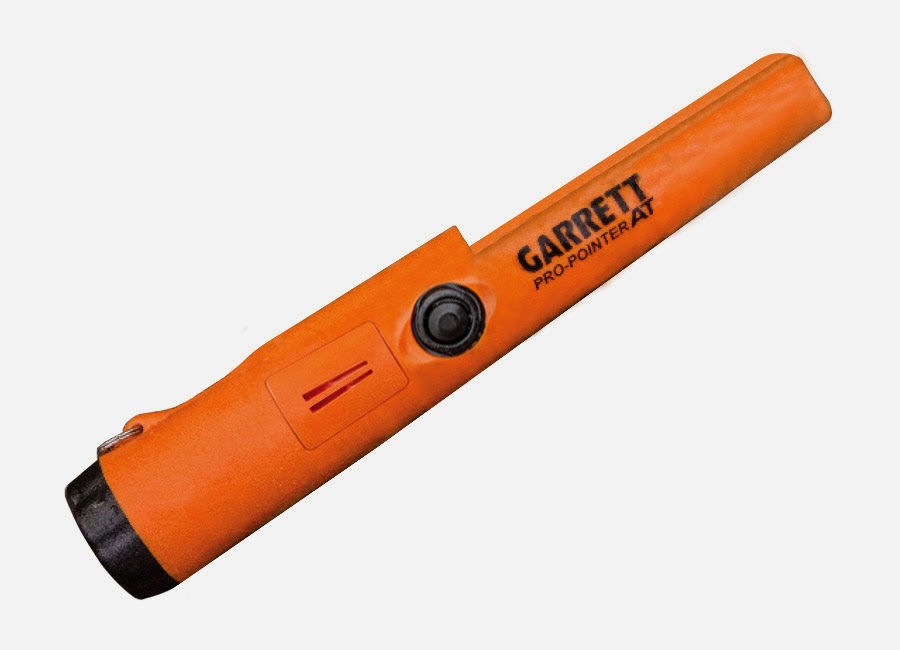
Review: The Garrett Carrot Pro Pointer AT

As I was preparing for metal detecting season this year, I was watching a metal detecting video online where I heard reference to the new “Garrett Carrot.” Intrigued, I did a little research online and found out this was a reference to the Garrett Pro Pointer AT, nicknamed the Garrett Carrot for its bright orange color.

I am a happy owner of the regular Garrett Pro Pointer and was very curious if the Garret Carrot would be worth the upgrade, especially since it is slightly more expensive than the regular Pro Pointer.

I decided to purchase the Garrett Carrot, which came out in 2015, for the reasons listed below:

1. Waterproofing: As soon as I found out that the Garrett Carrot was waterproof down to 10-feet, I immediately decided to purchase it. Although you can waterproof the original Pro Pointer, that involves rubbing all sorts of sticky goop on it (as you can see here), which I really did not want to do. There was a nice shallow stream I was detecting in with my regular Pro Pointer (which is water resistant but not submergible) but I was not able to get into deeper water with it. The Garrett Carrot changes that.

2. Easier to find if lost: The bright orange color makes the Garrett Carrot very easy to find if you drop it by accident or set it down somewhere and forget it, unless you drop it in a pumpkin patch or a carrot farm. Even if you did that though, the Garrett Carrot automatically emits a distress signal 5-minutes after it is dropped. The regular Pro Pointer does not do this. After 5-minutes of warning chirps (that become more frequent over time), it shuts off to save batteries.

3. Six different settings: Another great feature is the ability to set the Garrett Carrot to vibration mode or audio mode. Each mode has settings of minimum, medium, and maximum sensitivity. The vibration mode is good if you are near people and do not want to make much noise, if you are under water, or if you are hearing impaired. The default setting is medium sensitivity with audio. I changed it to maximum sensitivity with audio so I do not miss the target. Some people may decide to set it to low sensitivity for highly mineralized ground environments but I would argue there is no need to do this if you just ground balance the pointer. Beau Ouimette shows how to do this in this great video. I tried it out and it works well. The Garrett Carrot has a quick-press Fast Return function that allows you to narrow the detection field of large objects. One reason why you really may want to switch to the low sensitivity mode is if you have an object in the ground close to a large metal structure (e.g., metal bench, play set) because now you can move away from the large metal structure, come in slow towards the target and only detect the target. If you had one standard setting as on the regular Pro Pointer, the signal from the large metal object will likely interfere with pinpointing the target.

4. Inch/Cm Markings: The Garrett Carrot has inch/cm markings which are lacking on the original Pro Pointer. This is not essential for the experienced detectorist but still a useful feature to have.

5. More sensitive to gold:
Need I say more.

6. Old Features: All features of original Pro Pointer are retained.

Overall, I highly suggest purchasing the Garrett Carrot for all of the reasons stated above. To put it simply, the best pointer on the market just got better and this is not a paid endorsement. I have had it for several weeks now and really enjoy it. The only downside is that because there are multiple detection settings, you may accidentally press the on button too long, enter reset mode, and switch to another setting by accident. Once you use it for a day though and read the instruction manual, this likely will not happen and if it does it is very easy to fix.